Invalid Chat Signature
Fixing the invalid chat signature error.
Relogging
If you’ve seen this message, it likely means your client isn’t sending your chat signature.
Failed to update secure chat state for Steve: 'Chat disabled due to missing profile public key. Please try reconecting' Relogging is a simple way that can possibly fix your issue, due to the nature of the problem. If this doesn’t resolve the issue, please continue reading.
Secure profiles
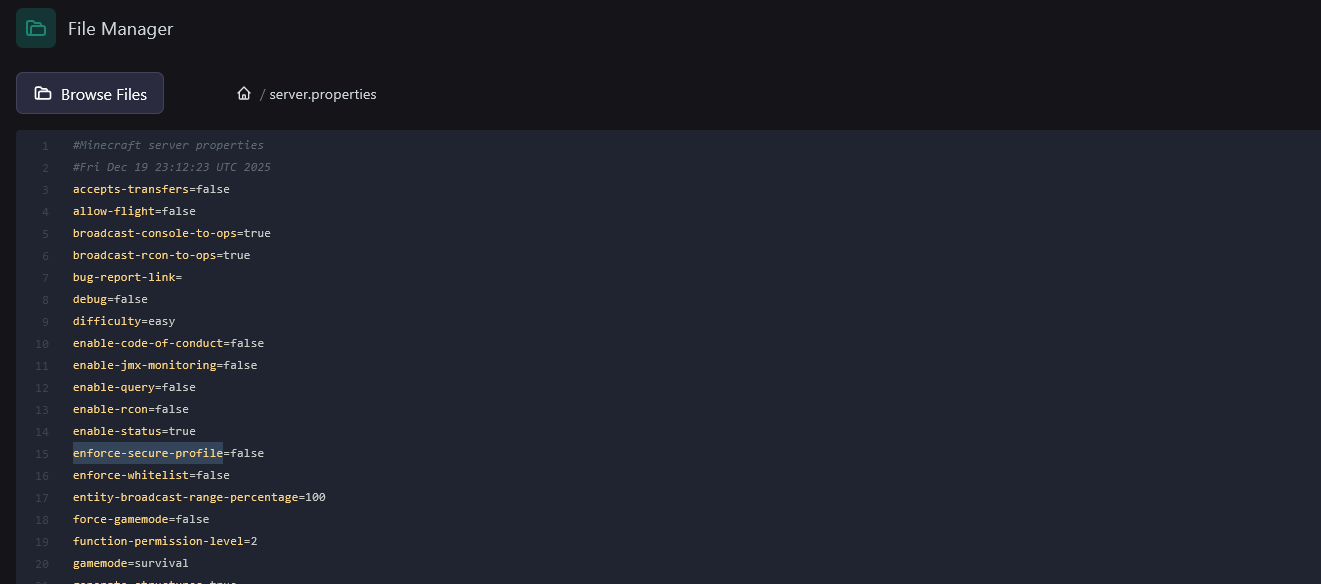
To fix this, open the file manager and go to server.properties
Find enforce-secure-profile=true (line 15) and change its value from true to false.
Success! You and your players can now send messages without Minecraft interfering.
Disabling chat reporting
Note: In 1.19.1, Mojang introduced chat reporting. Some players prefer this feature to be disabled so conversations remain moderated solely by the server rather than by Mojang.
Steps
- Download the plugin: https://www.spigotmc.org/resources/no-chat-reports.102990/
- Put the
.jarfile into your/pluginsfolder. - Restart the server.
Chat messages are now unreportable and Minecraft chat reporting is effectively disabled.